




How to place menu on the sidebar, footer area or at another part of your site
You may want to place a menu you have created at position you want. You may do so by creating a menu widget and then placing the menu widget at one of the numerous widget spaces in the site. To create a menu widget, follow the steps below:
- Log into the admin part of the site.
- Go to "Appearance and Design"
- Click on "Create Widget"
- The page for "Widget Types" may open (image below)
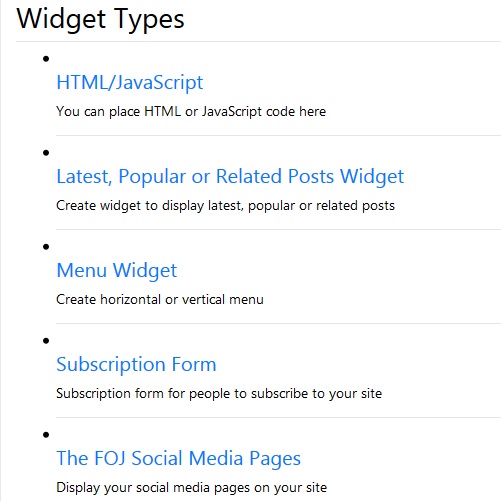
- Click on Menu Widget.
- The page for creating menu widget may open.
- Fill in the form for creating menu widget.
- The field named, "Widget Space" is a selection of all the spaces on the site where you may place the menu widget.
- Choose the widget space you want.
- The field named "Menu Source" is a selection of the menus available. Choose the menu you want.
- Click on "Submit" to create and save the menu widget.
- Go to the public part of the site and you may see the menu at the part of the site where you chose to place it.